Mcaster1DSPEncoder
Next Generation
The next evolution of broadcast encoding. Built from the ground up on Qt 6 with a modern dark broadcast UI, a full live TV video studio with transitions and overlays, professional-grade DSP audio processing, and simultaneous multi-format streaming to any Icecast2, Shoutcast, or Mcaster1DNAS server.
Officially Signed & Verified
The Mcaster1DSPEncoder installer and all binaries are signed with an SSL.com Individual Validation (IV) code signing certificate. Windows SmartScreen recognizes the verified publisher automatically — no warnings, no "Run anyway" prompts. The installer contains no malware, adware, or telemetry.
What Makes It Next Generation
Rebuilt from scratch on Qt 6 with a completely new architecture. This isn't a reskin — it's a ground-up redesign that adds live TV broadcasting, a professional video studio, broadcast-grade audio DSP, and a modern dark theme UI designed for on-air use.
Live TV Broadcast Studio
3-source preview monitors with a live program output. Switch between cameras, screen captures, and media files with 12 professional broadcast transitions. Stream to any RTMP, Icecast, or DNAS server.
7 DSP Audio Processors
10-Band Parametric EQ, 31-Band Graphic EQ, AGC/Compressor/Limiter, BBE Sonic Enhancer, DBX 286s Voice Processor, Push-to-Talk Duck, and Equal-Power Crossfader — all in a drag-and-drop effects rack.
8 Audio Codecs
MP3, Opus, Ogg Vorbis, FLAC, AAC-LC, HE-AAC v1, HE-AAC v2, and AAC-ELD. Encode at any bitrate from 16 kbps voice to 320 kbps music with per-slot codec selection.
Video Overlays & Graphics
Image overlays, lower thirds, tickers, and subtitle overlays on your live camera feed. Position, scale, and set opacity for each layer. Perfect for church services, live events, and music VJ sets.
Multi-Server Streaming
Stream to Icecast2, Shoutcast v1/v2, Mcaster1DNAS, YouTube Live, and Twitch simultaneously. Each encoder slot connects independently with its own codec, bitrate, and server target.
Church & Worship Ready
Built for houses of worship: stream live services with camera switching, scripture overlays, sermon titles, and worship lyrics. Feed to your website, YouTube, Facebook, or internal displays.
Two Broadcast Themes
Choose between a dark broadcast studio theme optimized for on-air use in low-light environments, or a classic light theme for daytime production work. Switch instantly from the View menu.
Dark Broadcast Theme
Deep navy and teal accents designed for broadcast studios, control rooms, and on-air talent. Reduces eye strain during long sessions. Glowing VU meters and teal accent highlights provide at-a-glance status without distraction.
Classic Light Theme
Clean white interface with blue accents for daytime production, editing, and configuration work. High contrast text and clear iconography make every control immediately readable in brightly lit environments.
Screenshot Gallery
Click any screenshot for a full-size view. All screenshots taken from v1.3.1-beta running on Windows 11.
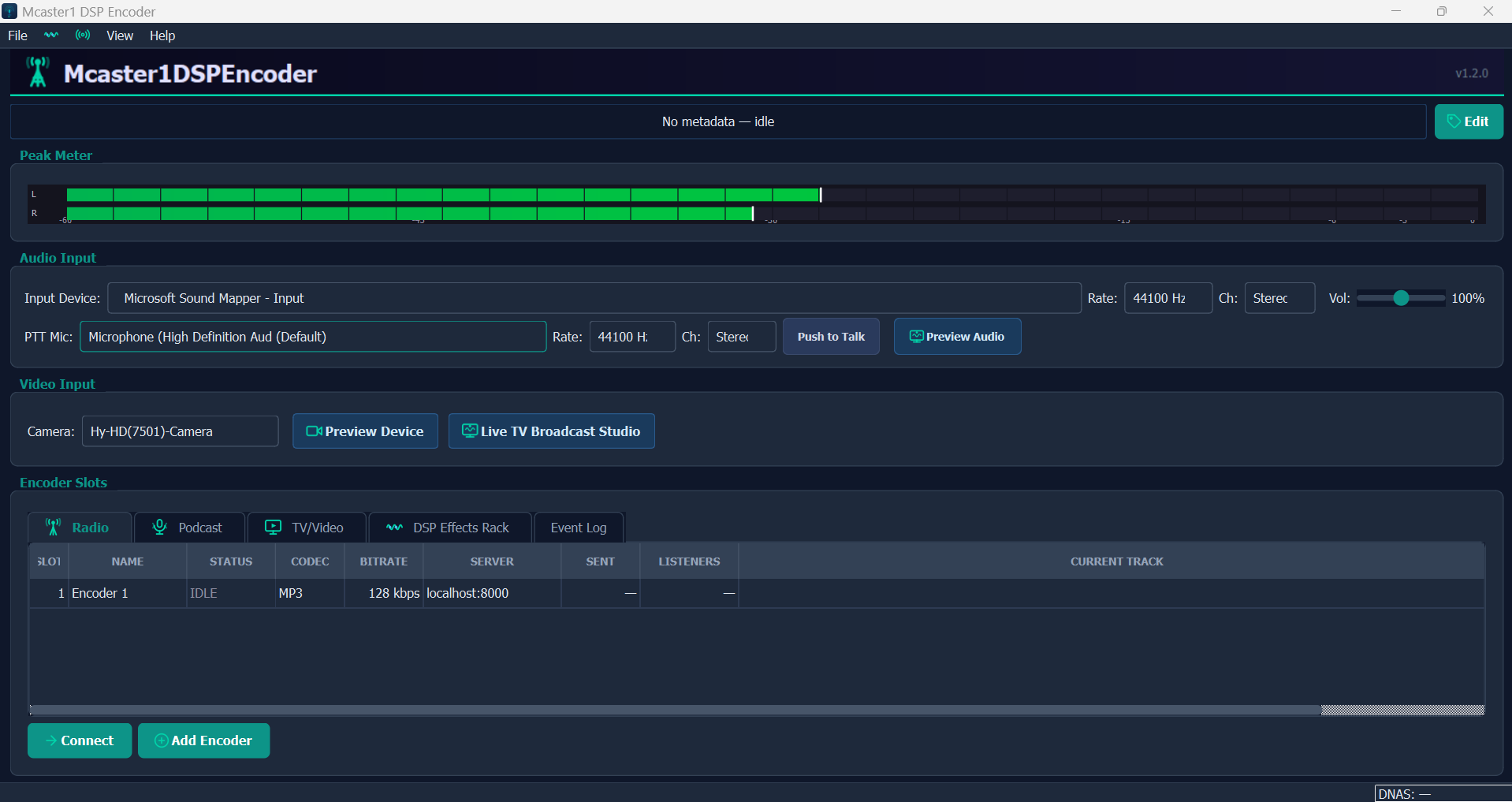
Main Window
The primary encoder interface showing the real-time peak meter with L/R VU bars, audio input device selector with WASAPI/ASIO/DirectSound support, PTT microphone assignment, video input camera preview, and the encoder slots table with status, codec, bitrate, server, and current track columns. The bottom bar shows Connect/Add Encoder controls and a live DNAS server status indicator.
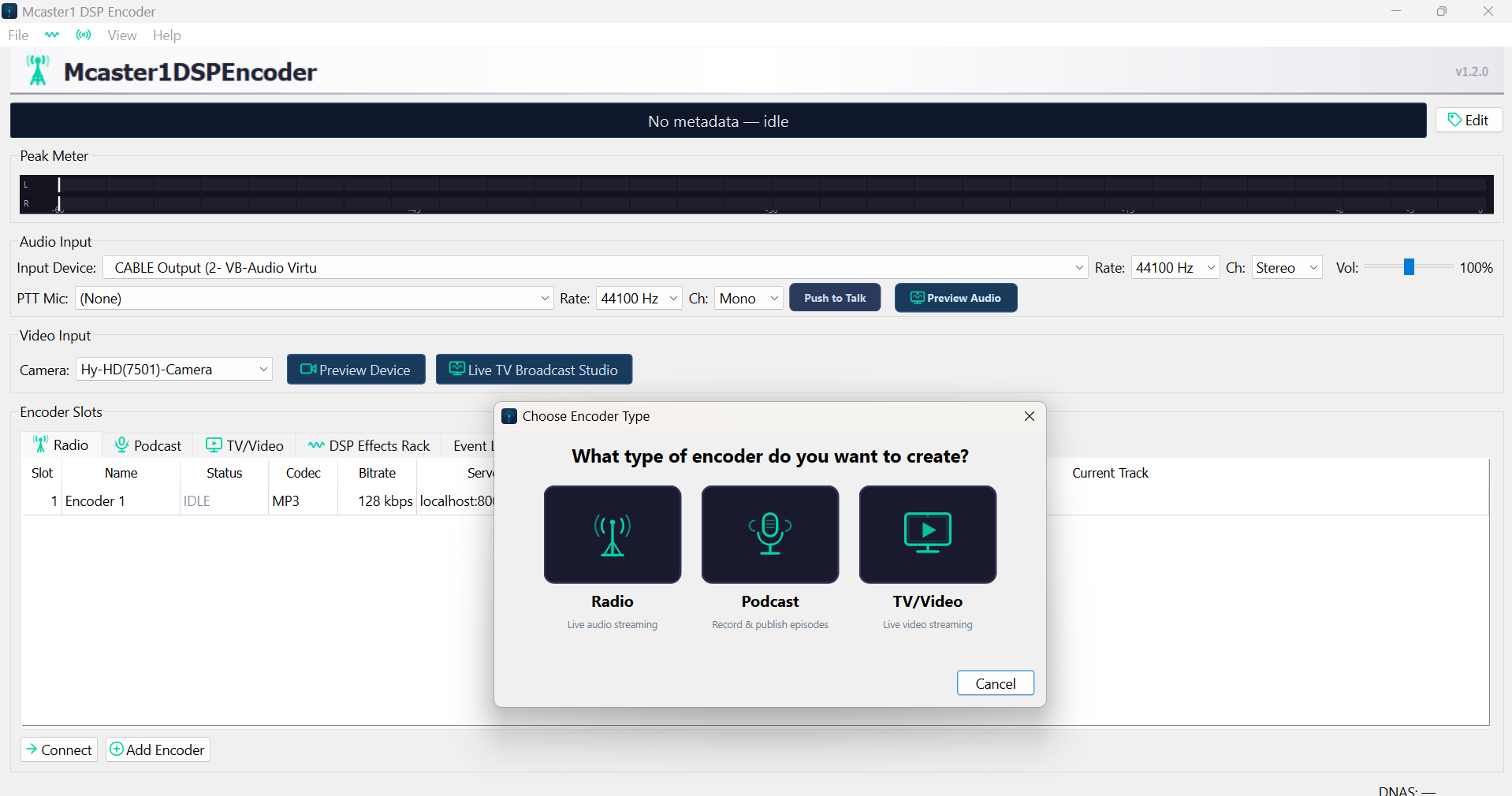
Encoder Type Chooser
Modal dialog for creating a new encoder slot. Three encoder types: Radio (live audio streaming for internet radio), Podcast (record and publish episodes), and TV/Video (live video streaming with camera and screen sources). Each type pre-configures optimal codec, bitrate, and server settings.
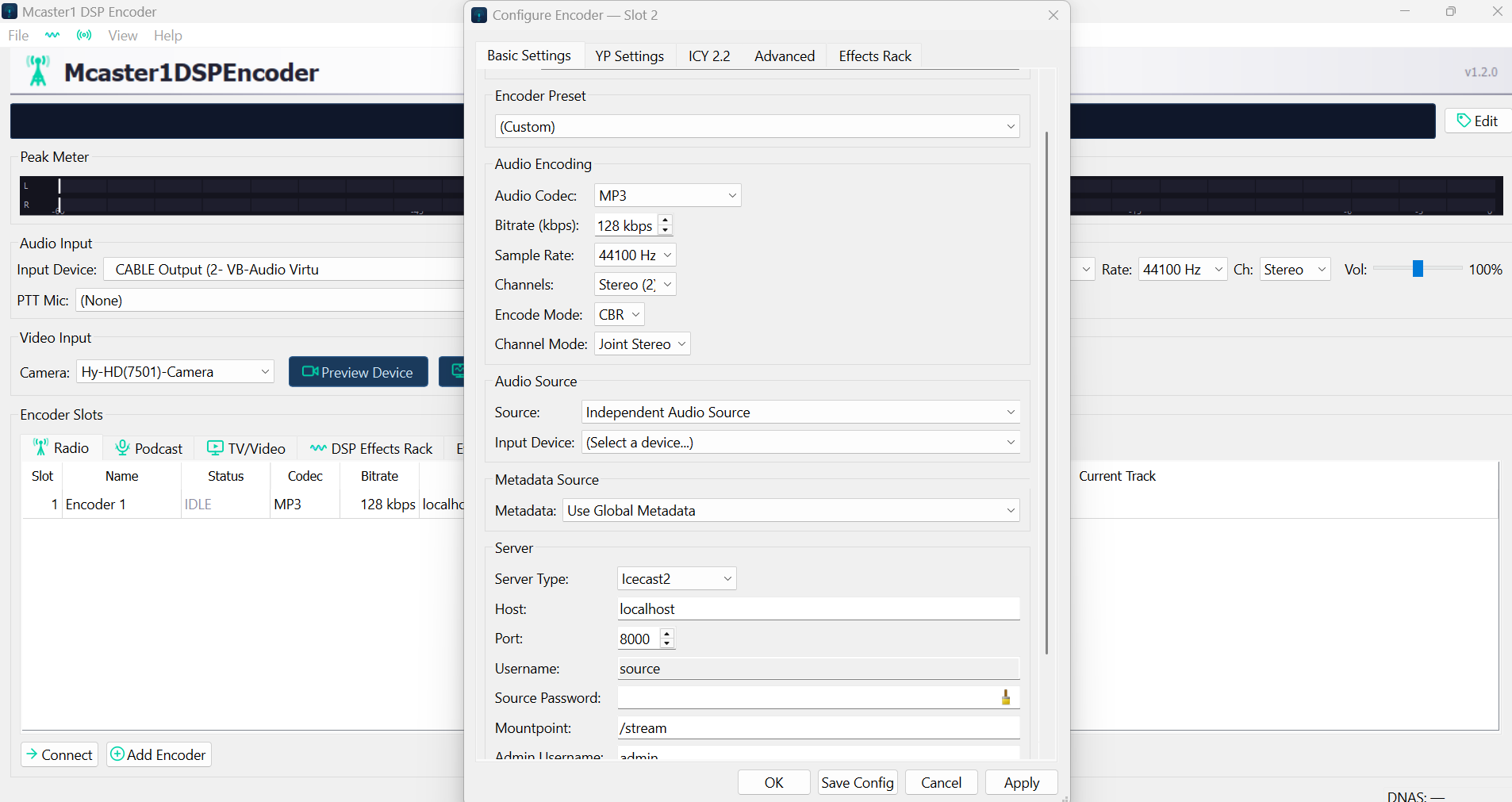
Basic Settings Panel
The 6-tab encoder configuration dialog showing Basic Settings. Configure audio codec (MP3, Opus, AAC, FLAC, Vorbis), bitrate, sample rate, channels, encode mode (CBR/VBR/ABR), audio source selection (device capture or independent source), metadata source, and streaming server connection (Icecast2, Shoutcast, DNAS) with host, port, username, password, and mountpoint.
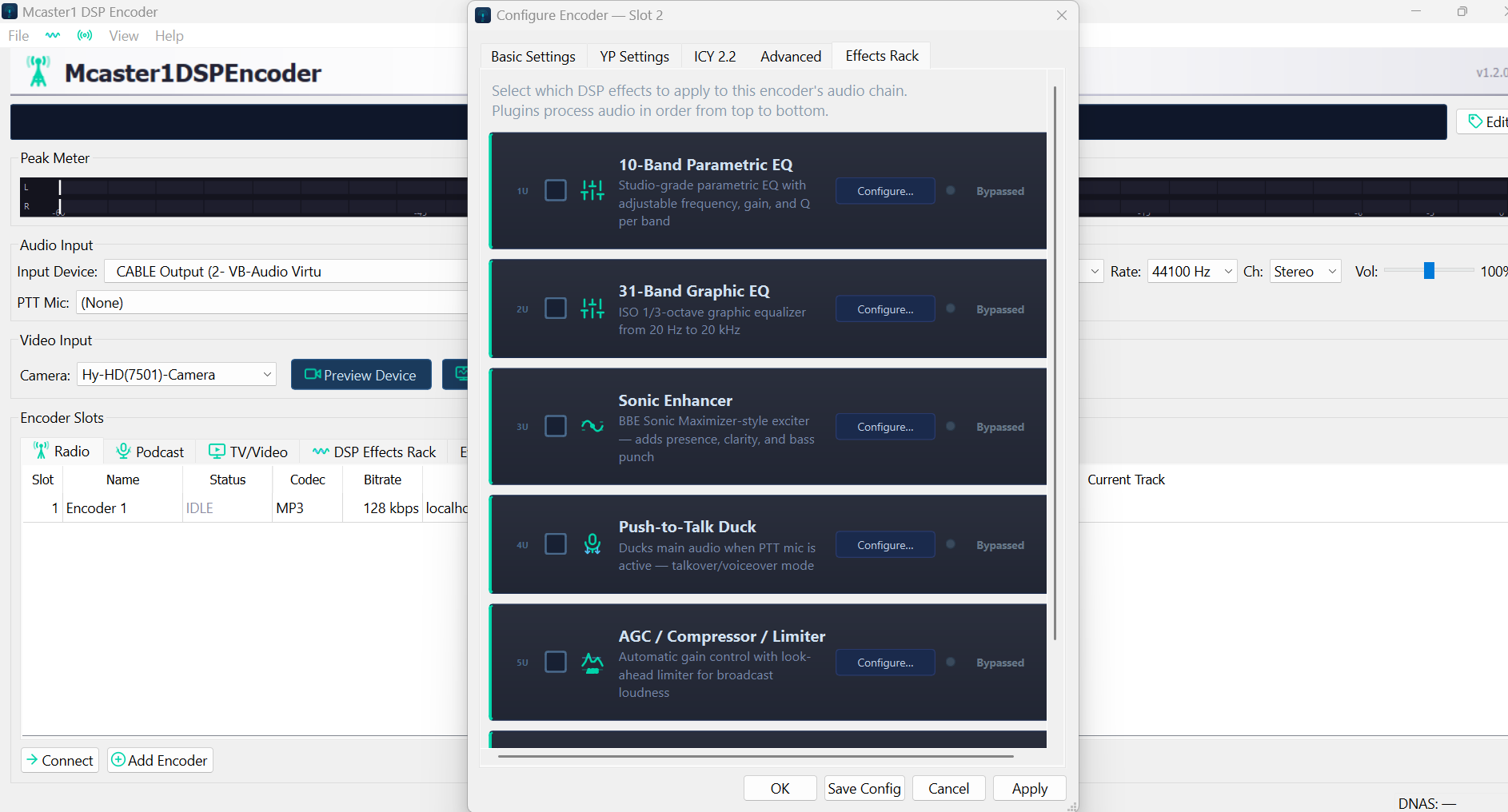
DSP Effects Rack
The Effects Rack tab showing all 7 audio processors in signal chain order: 10-Band Parametric EQ, 31-Band Graphic EQ, Sonic Enhancer (BBE clone), Push-to-Talk Duck, and AGC/Compressor/Limiter. Each processor has an enable toggle, a Configure button for detailed controls, and a Bypass button for A/B comparison. Processors are applied top-to-bottom.
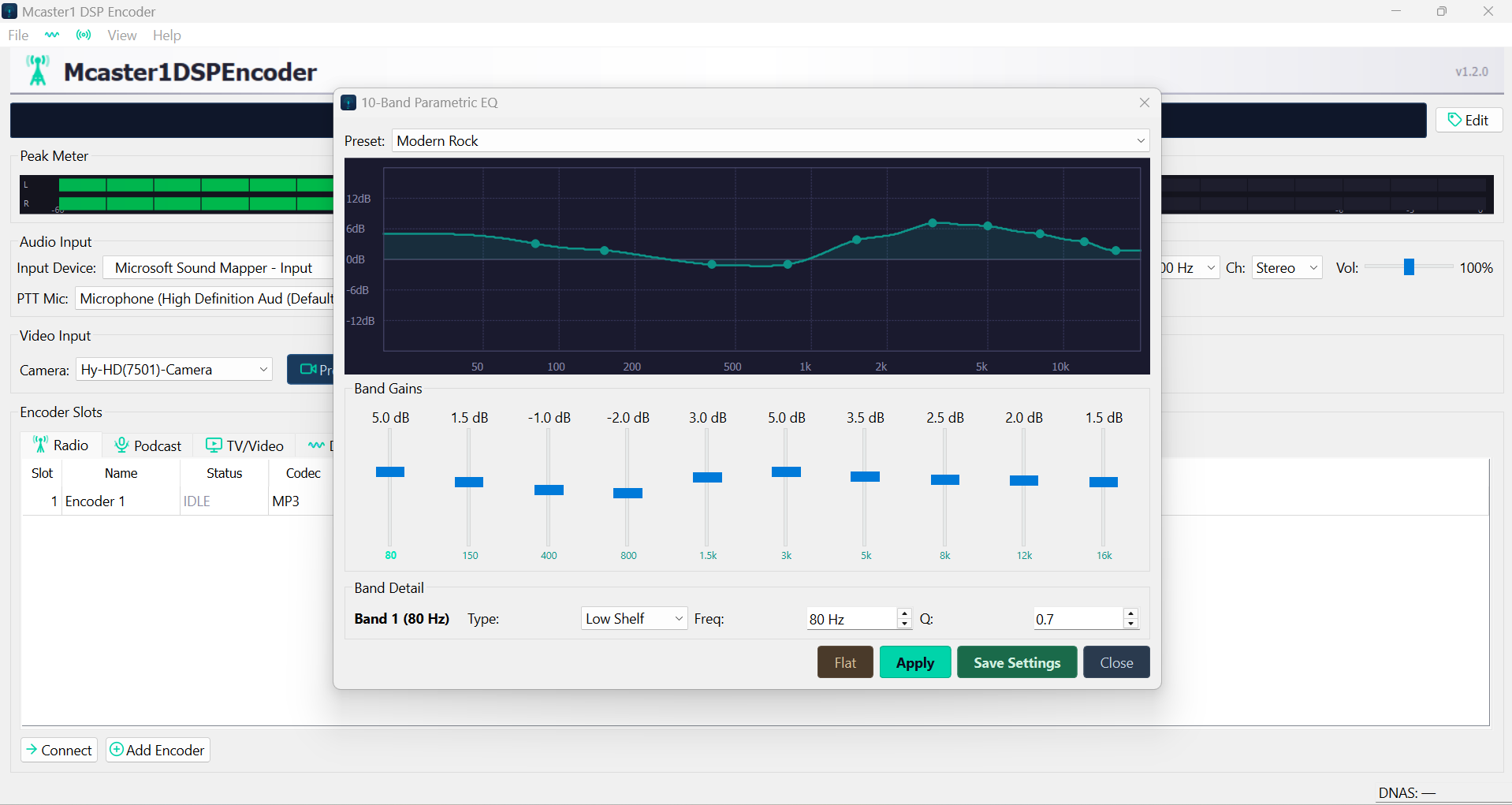
Parametric EQ
10-Band Parametric EQ with real-time frequency response curve visualization. Each band has independent gain (slider), frequency, Q factor, and filter type (Low Shelf, High Shelf, Peak) controls. Presets include Modern Rock, Broadcast Voice, Warm FM, and Flat. The curve display shows the combined EQ response across the 20 Hz to 20 kHz spectrum.
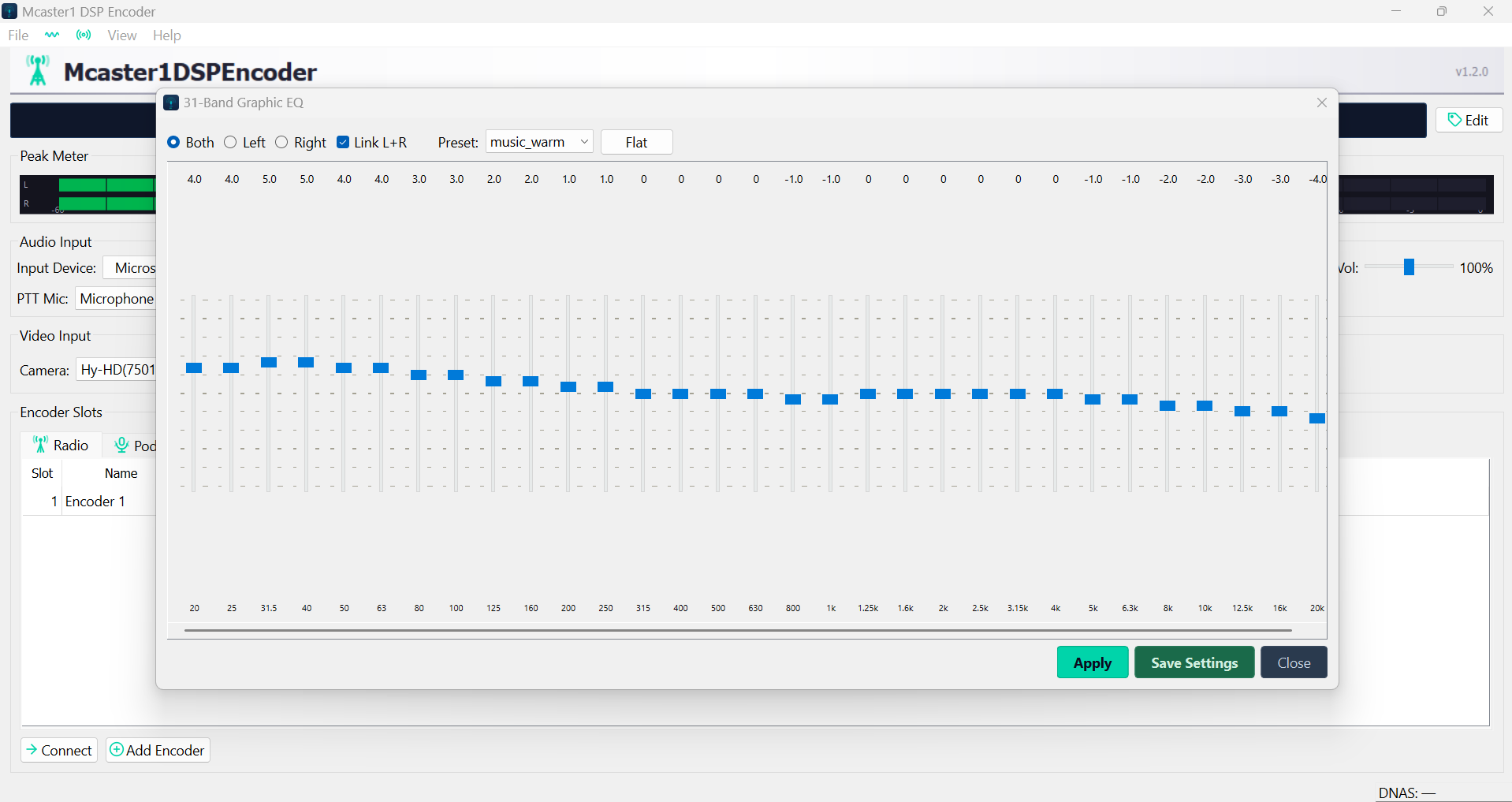
31-Band Graphic EQ
Full 31-band graphic equalizer with ISO standard center frequencies from 20 Hz to 20 kHz. Supports Both/Left/Right/Link L+R channel modes. Preset selector with music_warm and Flat options. Each band provides -12 dB to +12 dB gain via vertical sliders for precise broadcast audio shaping.
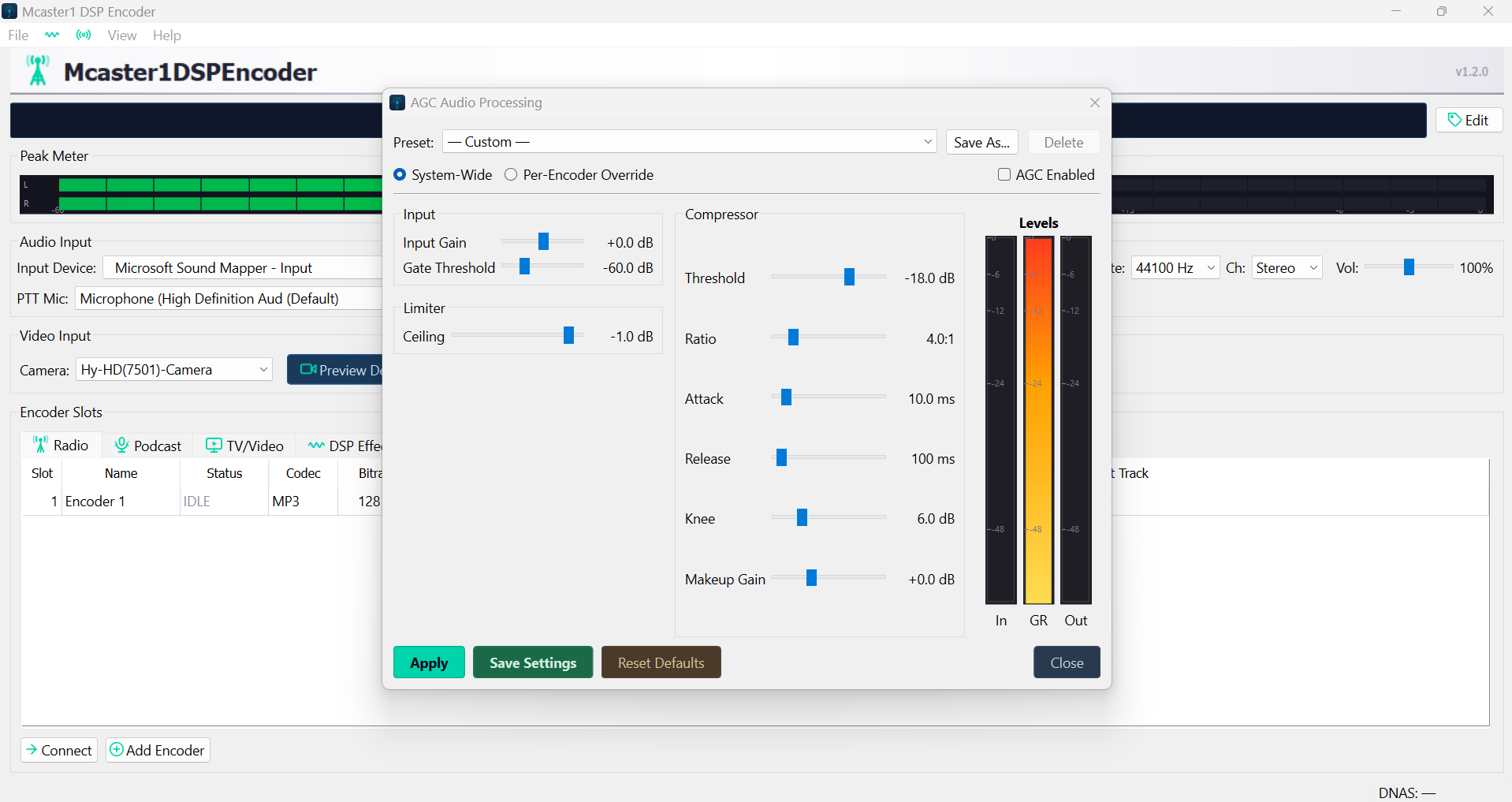
AGC / Compressor / Limiter
Professional AGC audio processing panel with input gain, gate threshold, compressor (threshold, ratio, attack, release, knee), hard limiter (ceiling), and makeup gain controls. Real-time Levels meter shows Input, Gain Reduction, and Output levels simultaneously. Supports System-Wide or Per-Encoder Override modes with preset save/load.
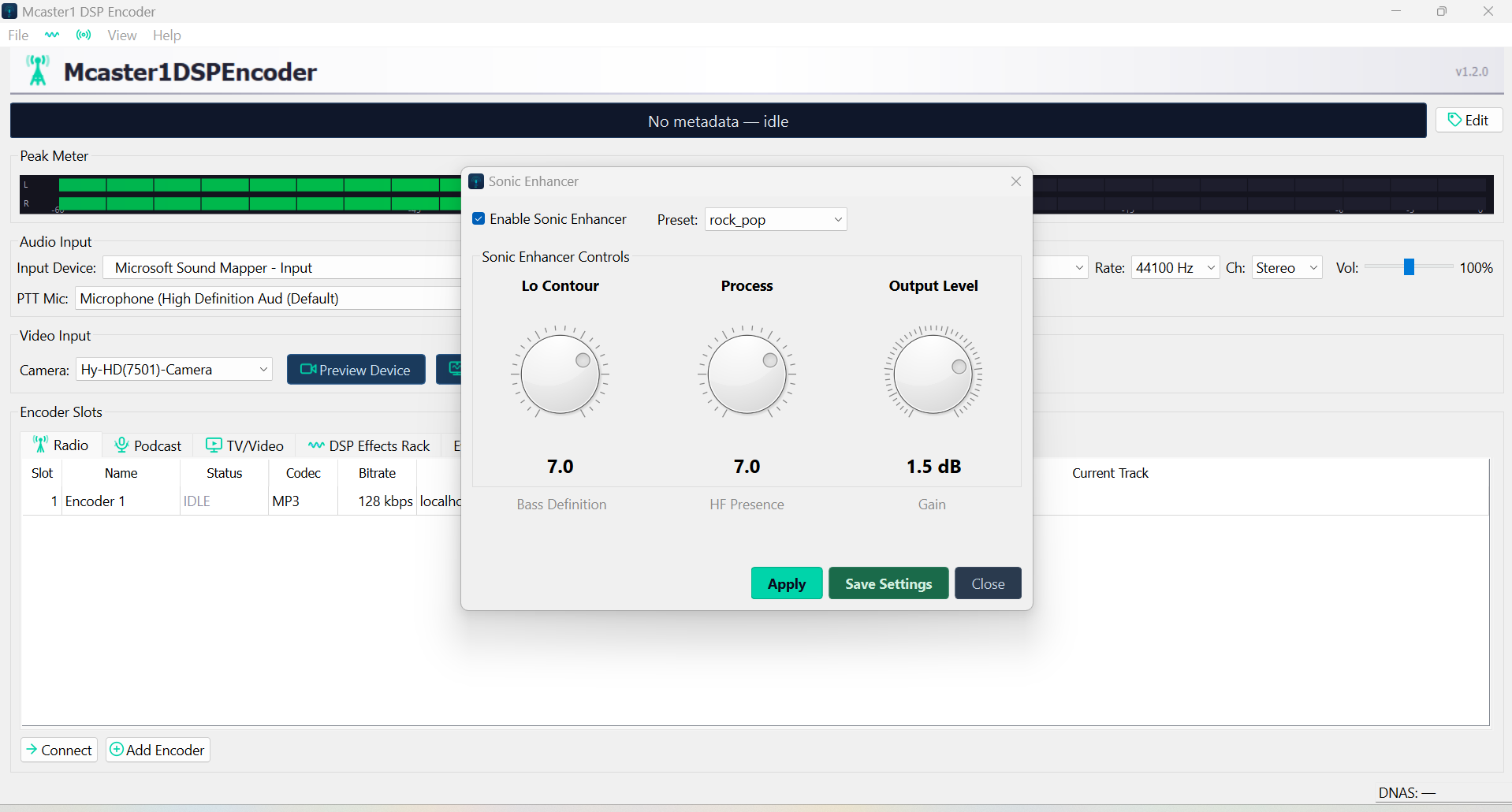
Sonic Enhancer
BBE Sonic Maximizer-style audio enhancer with three rotary knobs: Lo Contour (bass definition, 0-10), Process (harmonic presence and clarity, 0-10), and Output Level gain trim. Preset selector includes rock_pop and other genre-tuned profiles. Adds broadcast-quality presence and punch without distortion.
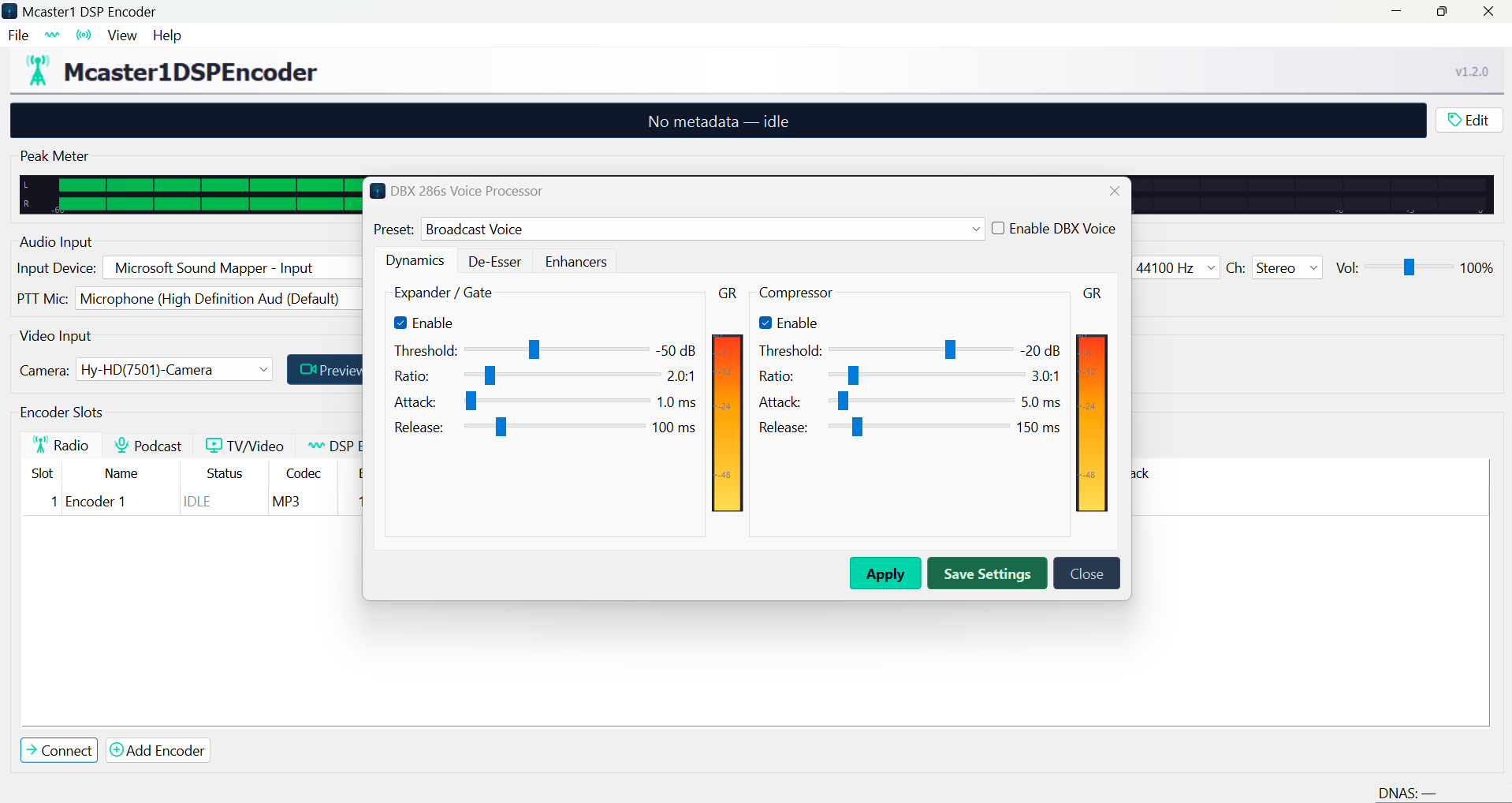
DBX Voice Processor
Professional DBX 286s-style voice processor with three stages: Expander/Gate (threshold, ratio, attack), Compressor (threshold, ratio, attack, release), and Enhancer. Real-time GR (gain reduction) meters show compression and expansion activity. Preset selector includes Broadcast Voice for on-air talent processing.
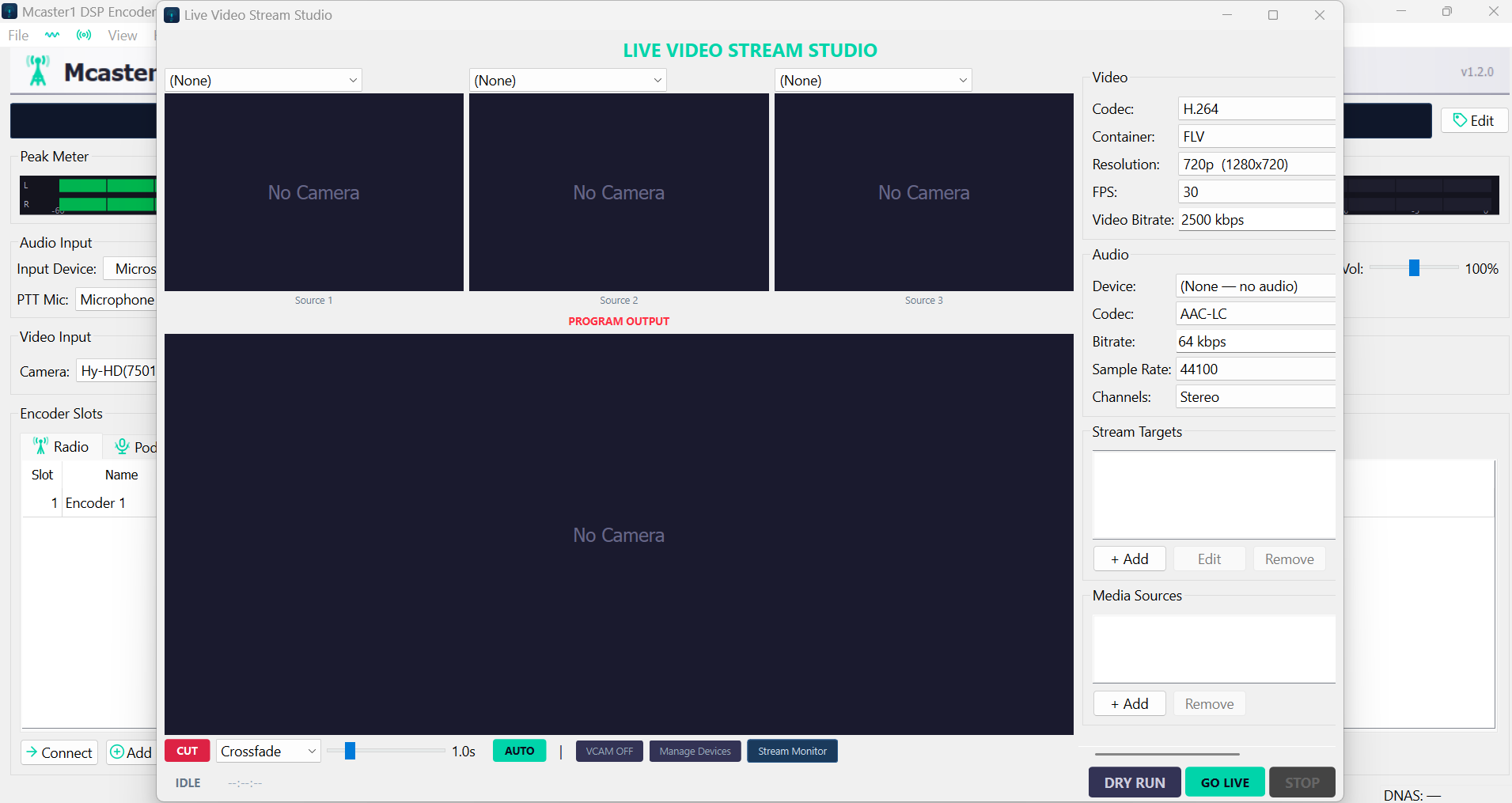
Live Video Stream Studio
Full live TV broadcast studio with 3 preview source monitors (cameras, screen captures, or media files) and a large program output monitor. Right panel shows video codec (H.264), container (MKV), resolution (720p/1080p), FPS (30), audio bitrate (2500 kbps), and stream target configuration. Bottom bar provides Cut/Crossfade transitions with adjustable duration, plus Dirt Run and Go Live controls.
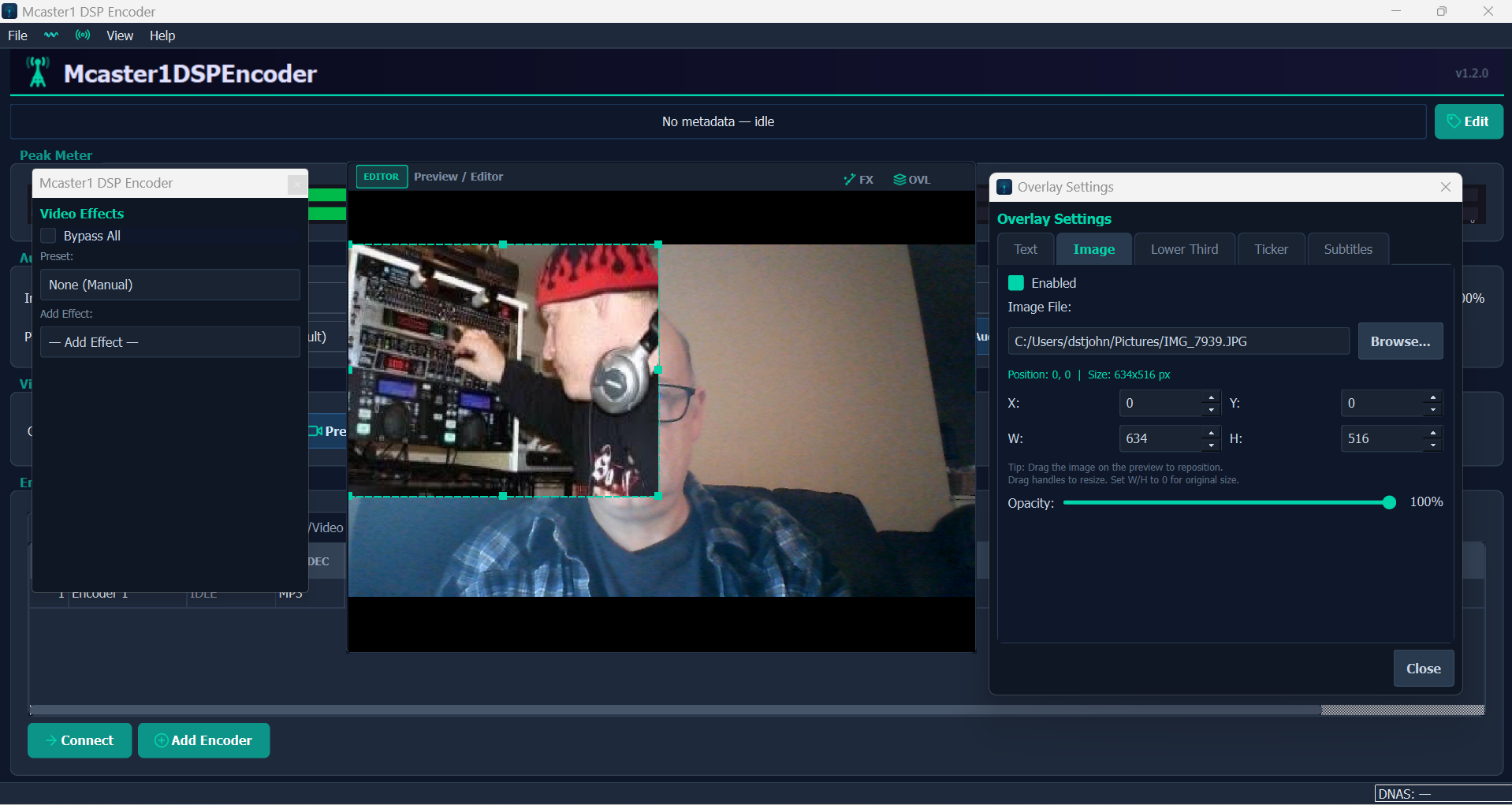
Video Overlay Settings
Image overlay configuration on a live camera feed. The Overlay Settings panel supports 5 overlay types: Text, Image, Lower Third, Ticker, and Subtitles. Each overlay has position (X/Y), size (W/H), and opacity controls. The preview shows a branded overlay composited on a live webcam feed with the Main Effects sidebar showing DSP processing options.
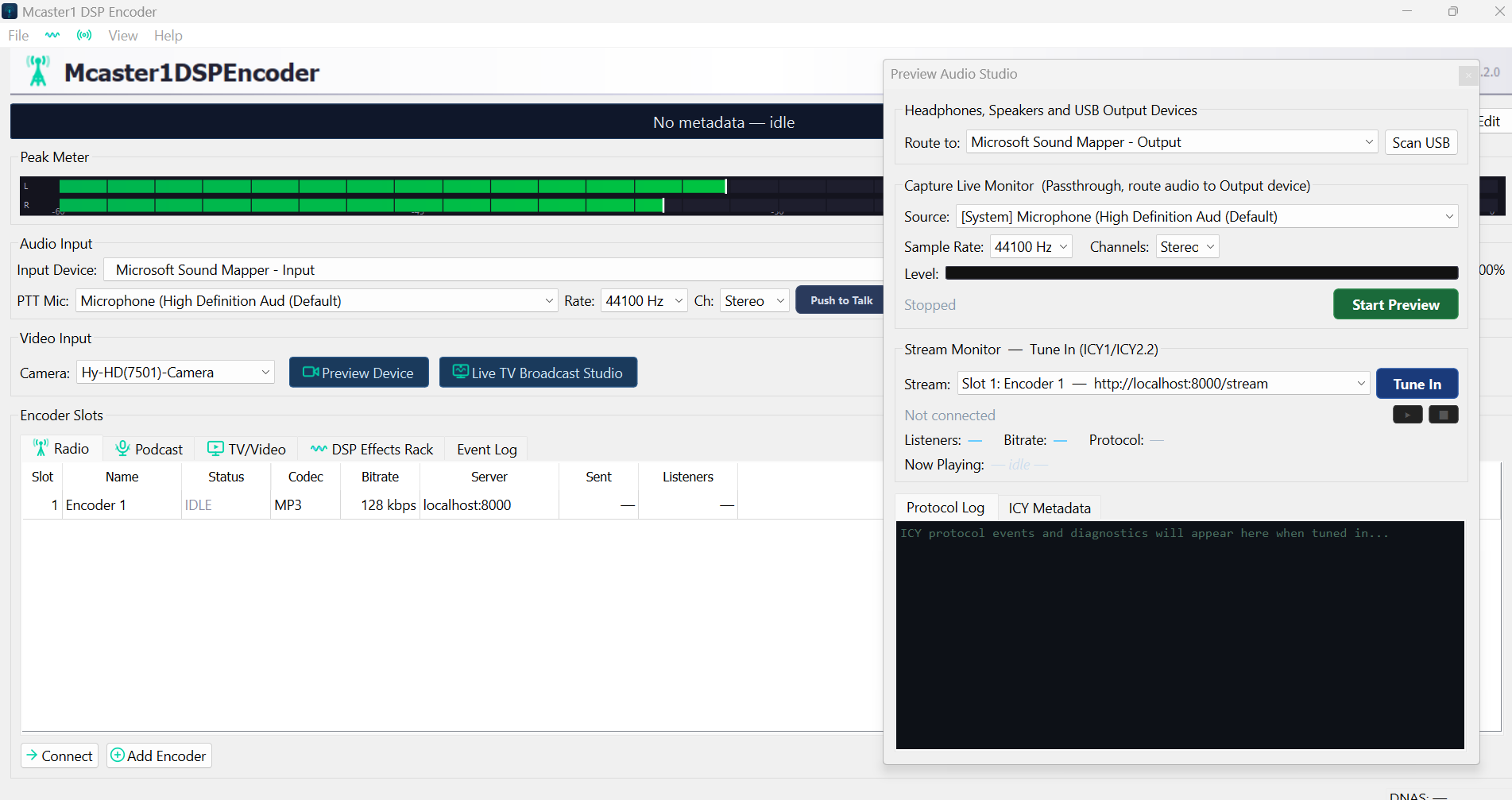
Preview Audio Studio
Audio monitoring and preview panel with headphone/speaker output device routing, capture live monitor (passthrough to output device), sample rate and channel configuration, and a live Stream Monitor that tunes into your own Icecast/DNAS stream showing listener count, bitrate, protocol, now playing track, and a scrolling ICY metadata protocol log.
Audio & Video Codecs
Audio Codecs
| Codec | Library | Bitrate Range | Modes | Container |
|---|---|---|---|---|
| MP3 | LAME | 32 – 320 kbps | CBR, VBR, ABR | Icecast/Shoutcast |
| Opus | libopus | 6 – 510 kbps | VBR, CVBR, CBR | Ogg |
| Vorbis | libvorbis | 45 – 500 kbps | VBR (quality 0-10) | Ogg |
| FLAC | libFLAC | Lossless | Compression 0-8 | Ogg |
| AAC-LC | fdk-aac | 64 – 320 kbps | CBR, VBR | ADTS |
| HE-AAC v1 | fdk-aac | 32 – 128 kbps | CBR, VBR | ADTS |
| HE-AAC v2 | fdk-aac | 16 – 64 kbps | CBR, VBR | ADTS |
| AAC-ELD | fdk-aac | 24 – 128 kbps | CBR | ADTS |
Video Codecs
| Codec | Resolutions | FPS | Container | Use Case |
|---|---|---|---|---|
| H.264 | 720p, 1080p, 4K | 24, 30, 60 | MKV, MP4, FLV | Live streaming, recording |
| VP8 | 720p, 1080p | 24, 30 | WebM | Web streaming |
| VP9 | 720p, 1080p, 4K | 24, 30, 60 | WebM | High-quality web delivery |
Live Video Broadcast Studio
The built-in TV studio transforms Mcaster1DSPEncoder from an audio-only tool into a complete live video production suite. Whether you're streaming a church service, hosting a live DJ set with visuals, or running a multi-camera talk show, the video studio gives you everything in one application.
Studio Layout
- 3 Preview Sources — monitor cameras, screen captures, and media files side by side before going live
- Program Output — the live broadcast feed with real-time overlay compositing
- 12 Broadcast Transitions — Cut, Crossfade, Dip to Black, Dip to White, Wipe Left/Right/Up/Down, Slide, Zoom, Spin, and Blur
- Adjustable transition speed — 0.1s snap cut to 5.0s slow dissolve
- Dirt Run mode — rehearse transitions and overlays without actually streaming
- Go Live — one-click to begin broadcasting to all configured stream targets
Overlay System
- Image overlays — logos, watermarks, branded frames with position, scale, and opacity controls
- Lower thirds — name/title graphics for speakers, guests, and presenters
- Tickers — scrolling text for news, announcements, or song request updates
- Subtitles — live or pre-set subtitle tracks for accessibility
- Text overlays — custom text with font, size, color, and positioning
Church & Worship Use Cases
- Stream Sunday services live to your website, YouTube, and Facebook simultaneously
- Display scripture verses, sermon titles, and worship lyrics as lower third overlays
- Switch between pulpit camera, wide shot, and pre-recorded video announcements
- Record the full service in H.264/MKV for later upload or archive
- Audio DSP ensures consistent broadcast volume regardless of speaker microphone technique
Music VJ & DJ Use Cases
- Mix live camera feeds with music visualizers, album art, and video loops
- Apply real-time visual transitions synchronized with beat drops
- Stream to Twitch, YouTube Live, or your own Icecast video mountpoint
- Use the DSP chain for broadcast processing: EQ, AGC, Sonic Enhancer, and crossfader
System Requirements
| Component | Minimum | Recommended |
|---|---|---|
| OS | Windows 10 (64-bit) | Windows 11 (64-bit) |
| CPU | Dual-core 2.0 GHz | Quad-core 3.0+ GHz (for video) |
| RAM | 4 GB | 8+ GB (for video studio) |
| Disk | 200 MB (install) | 2+ GB (with recordings) |
| GPU | Any DirectX 11 | Dedicated GPU (for 1080p video encoding) |
| Network | 1 Mbps up | 5+ Mbps up (for video streaming) |
| Camera | Any USB webcam | HDMI capture card (for studio cameras) |
macOS DSP Encoder — Coming Soon
The Next Generation encoder is built on Qt 6 — a cross-platform framework. The macOS build is based on the same Qt codebase as the Windows release and will ship with identical features: the full video studio, all 7 DSP processors, both themes, and multi-server streaming.
- Universal binary (Apple Silicon M1/M2/M3 + Intel x64)
- CoreAudio device capture (built-in mic, USB interfaces, Aggregate Devices)
- AVFoundation camera capture for the video studio
- Native macOS .dmg installer with drag-to-Applications workflow
- Same Qt 6 UI with dark/light theme support and native macOS styling
- Full feature parity with Windows release
The macOS build is currently in internal testing. Release date will be announced on this page and in the product roadmap.
Legacy Encoders
Windows Legacy (MFC v5.0)
The original Win32 MFC desktop encoder with PortAudio WASAPI/ASIO capture, up to 10 simultaneous slots, system tray integration, VU meters, Winamp/foobar2000/RadioDJ plugins, and podcast RSS generation. Built with Visual Studio 2022. Status: Stable, maintenance only.
Linux Headless (v1.4.5)
C++17 headless daemon with embedded HTTPS admin server, PHP web control panel, MariaDB media library, 8-algorithm playlist generator, DSP chain (EQ/AGC/crossfader), streaming server relay monitor, and system health telemetry. 12 simultaneous slots. Status: Active development continues on linux-dev branch.
Download Mcaster1DSPEncoder Next Generation
Free to download and use. Built by broadcasters, for broadcasters. Stream your radio station, podcast, church service, or live event to the world.